- +971 56 918 6895
- sales@globaltechuae.com
- Salah Al Din Road, Deira, Dubai-UAE

Full Screen Laptops: Guide to Edge-to-Edge Displays


The landscape of mobile computing has transformed dramatically over the past decade, with manufacturers pushing the boundaries of design to maximize screen real estate. Full screen laptops represent the culmination of this evolution, offering users expansive displays with minimal bezels that create an immersive computing experience. These devices prioritize visual engagement by minimizing the frame around the display, delivering more workspace within the same physical footprint as traditional models. Whether you're a creative professional requiring maximum canvas space, a business user managing multiple applications, or a casual consumer seeking enhanced entertainment value, understanding the technology and benefits of these modern devices will help you make an informed purchasing decision.
Understanding Full Screen Laptop Technology
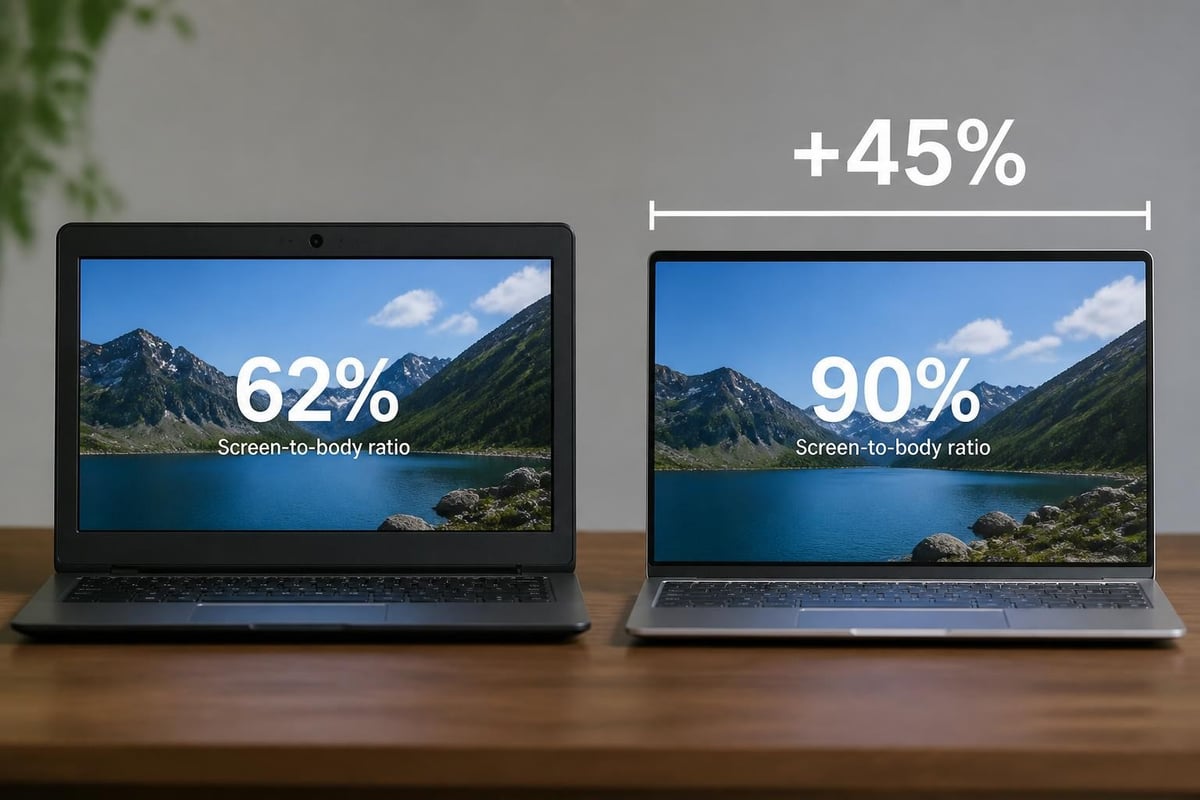
Full screen laptops distinguish themselves through significantly reduced bezels surrounding the display panel. Unlike traditional laptops with thick frames, these modern devices achieve screen-to-body ratios exceeding 85%, with premium models reaching upward of 92%.
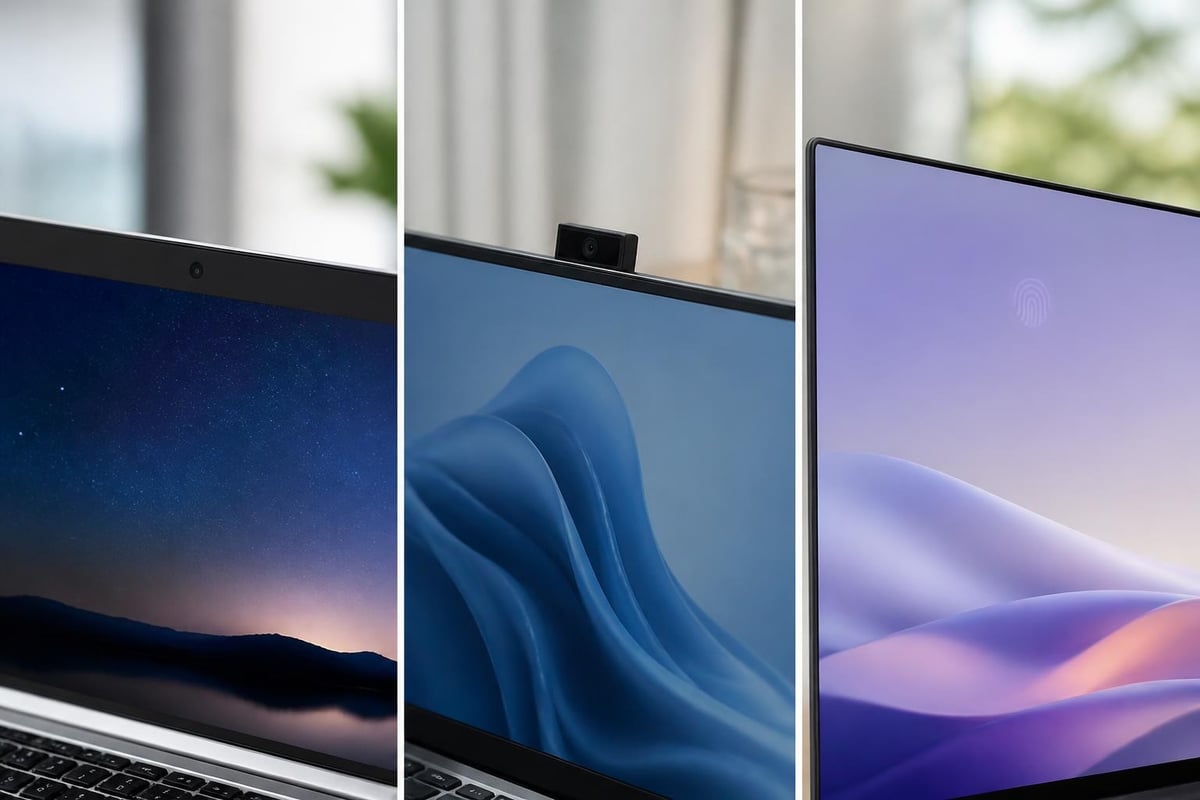
The engineering challenges behind creating full screen laptops involve several technical innovations. Manufacturers must relocate webcams, microphones, and sensors traditionally housed in the top bezel. Some brands embed cameras beneath the display using advanced imaging technology, while others position them in the keyboard deck or employ pop-up mechanisms.
Key Technologies Enabling Edge-to-Edge Displays
Modern full screen laptops incorporate several breakthrough technologies:
- Narrow-bezel LCD panels with edge-illuminated LED backlighting
- OLED displays that eliminate backlight requirements for thinner profiles
- Under-display camera technology currently in development stages
- Precision manufacturing techniques for millimeter-accurate assembly
- Advanced hinge designs that support larger displays without structural compromise
Display manufacturers have refined their production processes to create panels where the active display area extends closer to the physical edge. This requires sophisticated bonding techniques and protective coatings that prevent damage while maintaining optical clarity.
Benefits of Full Screen Laptop Designs
The advantages of full screen laptops extend beyond aesthetic appeal, delivering tangible productivity and usability improvements across various use cases.
Enhanced Productivity and Workspace
Business professionals working with spreadsheets, documents, and presentations benefit from additional vertical and horizontal space. The expanded display area allows more content visibility without scrolling, reducing eye strain and improving workflow efficiency.
Improved Entertainment Experience
Video content, gaming, and multimedia applications leverage the immersive quality of edge-to-edge displays. The minimal bezel distraction creates a theater-like experience, particularly valuable for users who frequently stream content or engage in creative work.
Portability Without Compromise
| Feature | Traditional Laptop | Full Screen Laptop |
|---|---|---|
| Screen Size | 15.6 inches | 15.6 inches |
| Physical Footprint | Larger chassis | Compact chassis |
| Weight | Heavier | Lighter |
| Display Area | Limited by bezels | Maximized |
| Portability Rating | Standard | Enhanced |
Full screen laptops pack larger displays into smaller chassis dimensions. A device with a 15.6-inch display might occupy the physical space previously required for a 14-inch model, making it easier to transport without sacrificing screen real estate.
Display Specifications and Resolution Standards
Understanding display resolution standards becomes essential when evaluating full screen laptops, as the expanded viewing area makes resolution quality more noticeable.
Common Resolution Options
Full HD (1920×1080)
Entry-level full screen laptops typically offer Full HD resolution, providing adequate clarity for general computing tasks, office applications, and casual entertainment.
Quad HD (2560×1440)
Mid-range models often feature QHD displays, delivering sharper text rendering and enhanced detail for photo editing, graphic design, and content consumption.
4K UHD (3840×2160)
Premium full screen laptops incorporate 4K panels for professional creative work, video editing, and users demanding maximum visual fidelity.
Display Technology Comparison
| Technology | Contrast Ratio | Color Accuracy | Power Consumption | Cost |
|---|---|---|---|---|
| IPS LCD | 1000:1 | Excellent | Moderate | Standard |
| OLED | Infinite | Superior | Variable | Premium |
| Mini-LED | 100,000:1+ | Excellent | Higher | Premium |
| Standard LCD | 700:1 | Good | Low | Budget |
The panel technology significantly impacts the viewing experience. OLED displays deliver perfect blacks and exceptional contrast ratios, making them ideal for multimedia work, while IPS panels offer consistent color reproduction across wide viewing angles, benefiting collaborative environments.
Webcam Solutions in Full Screen Designs
The relocation of webcams presents one of the most significant engineering challenges in full screen laptops. Manufacturers have developed several innovative solutions to maintain video conferencing capabilities while preserving minimal bezels.
Top-Mounted Tiny Cameras
Many full screen laptops incorporate miniaturized webcams positioned in a narrow top bezel measuring just 3-5 millimeters. These compact modules maintain adequate image quality for video calls while minimizing visual intrusion.
Pop-Up and Retractable Mechanisms
Some manufacturers employ mechanical solutions where webcams emerge from the keyboard deck or chassis when activated. While this approach preserves screen aesthetics, it typically results in unflattering camera angles during video conferences.
Under-Display Camera Technology
Research continues into under-display camera systems that position sensors beneath the screen panel. Current implementations face challenges with image quality, but rapid technological advancement suggests this will become the preferred solution for future full screen laptops.
- Requires transparent pixel arrays above the sensor
- Software processing enhances image clarity
- Still in early adoption phases for laptops
- Expected to mature significantly by 2027-2028
Screen-to-Body Ratio Benchmarks
Screen-to-body ratio serves as the primary metric for evaluating how effectively a device maximizes display area. This percentage represents the proportion of the device's front surface occupied by the active screen.
Calculation and Industry Standards
Manufacturers calculate screen-to-body ratio by dividing the display's active area by the total front surface area of the laptop when opened. Full screen laptops typically achieve the following benchmarks:
- Entry tier: 80-85% screen-to-body ratio
- Mid-range: 85-90% screen-to-body ratio
- Premium tier: 90-93% screen-to-body ratio
- Cutting-edge: 93%+ screen-to-body ratio
Real-world measurements sometimes differ from manufacturer specifications due to varying calculation methodologies. Some brands measure the ratio with the device open, while others account for the entire chassis footprint.
Business and Professional Applications
Full screen laptops deliver substantial value propositions for corporate environments and professional users across multiple sectors.
Corporate Deployment Considerations
Multi-Application Workflows
Professionals managing multiple applications simultaneously benefit from increased screen space for side-by-side window arrangements. Financial analysts, project managers, and administrative staff can view spreadsheets, email clients, and communication tools without constant window switching.
Presentation and Client Meetings
Sales professionals and consultants appreciate the enhanced visual impact when demonstrating products, sharing presentations, or conducting client reviews. The minimal bezel distraction keeps attention focused on content rather than hardware.
Field Work and Mobile Offices
Remote workers and field technicians who operate in various locations value the compact footprint combined with generous display area. Full screen laptops provide desktop-class productivity in portable form factors suitable for temporary workspaces.
Industry-Specific Benefits
| Industry | Primary Benefit | Secondary Advantage |
|---|---|---|
| Design/Creative | Maximum canvas area | Accurate color representation |
| Finance/Accounting | Enhanced spreadsheet visibility | Multi-window workflows |
| Education | Better presentation delivery | Collaborative viewing |
| Healthcare | Detailed medical imaging | Portable patient consultations |
| Engineering | CAD software optimization | Technical drawing clarity |
Considerations When Selecting Full Screen Laptops
Several factors beyond screen-to-body ratio influence the suitability of full screen laptops for specific use cases and user preferences.
Build Quality and Durability
The structural integrity of full screen laptops requires careful evaluation. Thinner bezels may increase vulnerability to screen damage from drops or pressure. Look for models with reinforced aluminum or magnesium alloy chassis that provide protection without adding excessive weight.
Battery Life Trade-offs
Larger displays typically consume more power, particularly at higher brightness levels and resolutions. When comparing full screen laptops, assess battery capacity specifications and real-world runtime reviews to ensure the device meets your mobility requirements.
Performance Specifications
Processor selection, RAM capacity, and storage configuration remain critical regardless of display design. Ensure the internal specifications align with your workload demands:
- Light use: Intel Core i5 or AMD Ryzen 5, 8GB RAM, 256GB SSD
- Moderate use: Intel Core i7 or AMD Ryzen 7, 16GB RAM, 512GB SSD
- Heavy use: Intel Core i9 or AMD Ryzen 9, 32GB RAM, 1TB+ SSD
Port Selection and Connectivity
Thinner chassis designs sometimes necessitate reduced port options. Verify that your chosen full screen laptop includes sufficient USB ports, HDMI/DisplayPort outputs, and any specialized connections your workflow requires. Some models compensate with Thunderbolt 4 ports offering versatile expansion capabilities.
Display Protection and Maintenance
Maintaining the pristine condition of expansive displays requires appropriate care practices and protective measures.
Screen Protection Strategies
Anti-Glare Coatings
Many full screen laptops feature anti-glare treatments that reduce reflections in bright environments. These coatings benefit users who work near windows or under overhead lighting, though they may slightly reduce color vibrancy compared to glossy panels.
Tempered Glass Screen Protectors
Aftermarket screen protectors provide additional scratch resistance, though installation on curved-edge displays requires precision. Consider this option for high-traffic environments or users prone to accidental contact with the screen.
Cleaning and Care Protocols
- Use microfiber cloths specifically designed for electronics
- Apply cleaning solution to the cloth, never directly to the screen
- Wipe in gentle circular motions to avoid streaking
- Avoid paper products that may scratch anti-glare coatings
- Close the laptop carefully to prevent keyboard-to-screen contact
Price Points and Market Segments
Full screen laptops span various price categories, with features and specifications scaling accordingly across different market segments.
Budget Segment ($400-$700)
Entry-level full screen laptops offer basic specifications suitable for web browsing, document creation, and media consumption. These models typically feature Full HD displays, mid-tier processors, and adequate RAM for standard productivity tasks.
Mid-Range Segment ($700-$1,500)
This category provides the optimal balance of features for most users. Expect QHD displays, current-generation processors, 16GB RAM, and quality build materials. These full screen laptops handle demanding applications while maintaining reasonable pricing.
Premium Segment ($1,500-$3,000+)
High-end models incorporate cutting-edge technology including OLED panels, maximum performance components, premium materials, and advanced features. Professional users requiring maximum capability invest in this segment.
| Price Range | Typical Specs | Target User |
|---|---|---|
| $400-$700 | FHD, i5/R5, 8GB | Students, basic users |
| $700-$1,200 | FHD/QHD, i7/R7, 16GB | Business professionals |
| $1,200-$2,000 | QHD/4K, i7/R7, 32GB | Creative professionals |
| $2,000+ | 4K OLED, i9/R9, 64GB | Specialized professionals |
Regional Availability and Support Infrastructure
Access to full screen laptops varies by geographic region, with supply chains and support networks particularly relevant for businesses operating in Africa and the UAE markets.
African Market Considerations
Technology adoption across African regions continues accelerating, with businesses increasingly seeking modern computing solutions. Full screen laptops serve growing sectors including finance, telecommunications, and creative industries. Reliable suppliers maintain inventory and provide warranty support throughout major commercial centers.
UAE Technology Landscape
The UAE represents a mature technology market with high demand for premium computing devices. Business districts in Dubai and Abu Dhabi house numerous enterprises requiring cutting-edge equipment. Full screen laptops meet the expectations of corporations prioritizing modern, efficient hardware for their workforces.
Support and Service Networks
When procuring full screen laptops for business deployment, verify that your supplier maintains:
- Local service centers for warranty repairs and technical support
- Rapid replacement programs minimizing downtime for critical users
- Certified technicians trained on specific manufacturer products
- Spare parts inventory for common repair scenarios
- Extended warranty options protecting long-term investments
Future Developments in Full Screen Technology
The trajectory of full screen laptops points toward continued refinement and innovation addressing current limitations while introducing new capabilities.
Emerging Technologies
Foldable and rollable display technology may eventually eliminate physical bezels entirely, though practical implementation for laptops remains several years away. More immediately, improvements in under-display camera quality will enable true edge-to-edge screens without aesthetic compromise.
Software Optimization
Operating systems continue evolving to better utilize expanded screen real estate. Window management features, virtual desktop enhancements, and application-specific optimizations help users leverage every pixel of their full screen laptops effectively.
The integration of artificial intelligence for dynamic display adjustments based on ambient lighting, content type, and user preferences represents another development area. These smart features will optimize battery life while maintaining visual quality across varying conditions.
Full screen laptops represent a significant advancement in mobile computing, combining expanded workspace with compact portability to serve modern business and personal computing needs. Understanding the technology, benefits, and selection criteria ensures you choose devices that align with your specific requirements and deliver long-term value. Whether you're equipping a corporate team, upgrading your home office, or supplying technology solutions across Africa and the UAE, Global Tronix Computer Trading LLC provides expert guidance and comprehensive product selection to meet your full screen laptop needs with reliable support and competitive solutions.
