- +971 56 918 6895
- sales@globaltechuae.com
- Salah Al Din Road, Deira, Dubai-UAE


Best Gaming Laptop Touch Screen: 2026 Buying Guide


Finding the best gaming laptop touch screen in 2026 requires balancing powerful hardware, responsive displays, and innovative input methods. Touchscreen functionality has evolved from a novel feature to a practical tool that enhances gaming experiences, productivity workflows, and creative applications. As manufacturers continue to refine display technology and processing power, touchscreen gaming laptops now deliver performance comparable to traditional gaming rigs while offering the flexibility of tablet-like interaction. This comprehensive guide explores the top models, essential specifications, and critical considerations for selecting a touchscreen gaming laptop that meets your performance expectations and budget requirements.
Understanding Touchscreen Technology in Gaming Laptops
Modern touchscreen displays have advanced significantly beyond their early implementations. Today's gaming laptops incorporate capacitive touch panels that support multi-touch gestures, high refresh rates, and accurate color reproduction without sacrificing response times.
The integration of touchscreen functionality in gaming laptops addresses several use cases beyond traditional gaming. Content creators benefit from direct manipulation of design elements, while strategy game enthusiasts find touch controls particularly intuitive for certain game genres. The technology has matured to the point where touchscreens offer genuine utility rather than serving as mere novelties.
Display Panel Types and Gaming Performance
Gaming laptops typically feature either IPS or OLED panels with touch capabilities. IPS displays offer excellent color accuracy and wide viewing angles, making them ideal for collaborative gaming sessions or content creation. OLED panels provide superior contrast ratios and faster pixel response times, which benefit fast-paced competitive gaming.
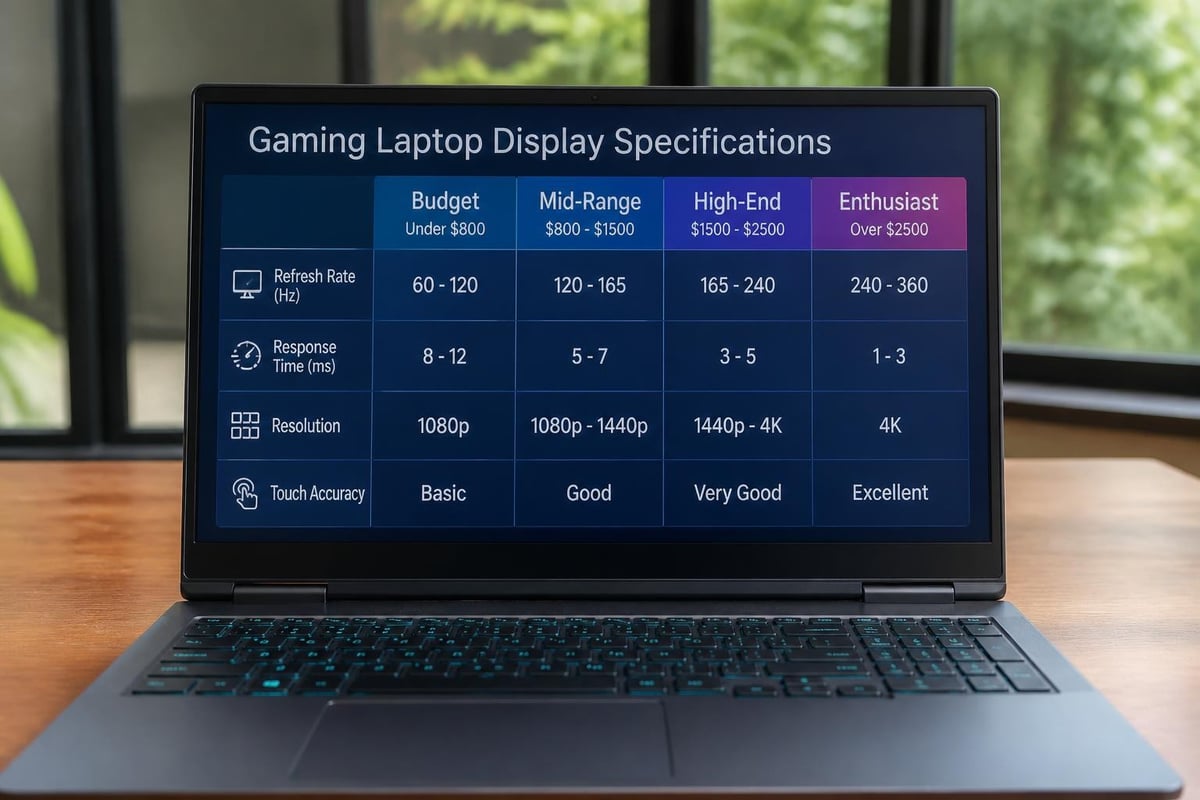
Key display specifications to prioritize:
- Refresh rate: 120Hz minimum, with premium models offering 144Hz or higher
- Response time: 5ms or lower for competitive gaming
- Resolution: 1920×1080 (Full HD) minimum, with 2560×1440 (QHD) preferred
- Color gamut: 100% sRGB coverage minimum, DCI-P3 for professional work
- Touch accuracy: 10-point multi-touch support standard
Top Performance Models for 2026
The best gaming laptop touch screen options in 2026 span multiple price categories and performance tiers. Premium models integrate cutting-edge processors, dedicated graphics cards, and high-quality touchscreen displays without compromising thermal management or battery efficiency.
High-End Gaming Powerhouses
Premium touchscreen gaming laptops feature the latest processor architectures and flagship graphics cards. These systems handle demanding AAA titles at maximum settings while providing smooth touch response for creative applications and productivity tasks.
The Dell Alienware 16X Aurora represents the pinnacle of gaming laptop design, combining a stunning touchscreen display with exceptional processing power. This high-performance system delivers consistent frame rates across demanding titles while maintaining accurate touch input during creative workflows.
| Model Category | Processor Options | Graphics Card Range | RAM Capacity | Price Range |
|---|---|---|---|---|
| Premium Tier | Intel Core i9-14900HX / AMD Ryzen 9 7945HX | RTX 4080 – RTX 4090 | 32-64GB DDR5 | $2,500-$4,000 |
| Mid-Range Tier | Intel Core i7-14700HX / AMD Ryzen 7 7840HS | RTX 4060 – RTX 4070 | 16-32GB DDR5 | $1,500-$2,500 |
| Entry-Level | Intel Core i5-13500H / AMD Ryzen 5 7640HS | RTX 4050 – RTX 4060 | 16GB DDR5 | $900-$1,500 |
Compact Powerhouses: 14-Inch Performance Leaders
Smaller form factors have gained popularity among gamers who value portability without sacrificing performance. The 14-inch category delivers impressive specifications within compact chassis designs.
Comparing the Acer Predator Triton 14 AI against the Razer Blade 14 reveals how manufacturers approach touchscreen integration differently. Both models offer responsive touch displays while maintaining thermal efficiency in confined spaces. The Predator emphasizes AI-enhanced performance scaling, while the Razer prioritizes build quality and display calibration.
Advantages of compact touchscreen gaming laptops:
- Enhanced portability for business travel and commuting
- Lower power consumption extending battery life
- Easier thermal management in smaller chassis
- More affordable component configurations
- Improved desk space efficiency
Balancing Touch Functionality with Gaming Requirements
Selecting the best gaming laptop touch screen involves understanding how touch capabilities interact with gaming performance. Not all touchscreen implementations deliver equal value across different use cases.
Touch Response and Gaming Genres
Different game genres benefit from touchscreen functionality to varying degrees. Real-time strategy games, city builders, and casual titles often feel more intuitive with touch input. First-person shooters and competitive multiplayer games typically perform better with traditional mouse and keyboard controls.
The practical value of touchscreens extends beyond gaming. Understanding whether you genuinely need touchscreen functionality helps justify the additional cost and potential battery impact. For professionals who alternate between gaming and creative work, touchscreens provide significant workflow advantages.
Battery Life Considerations
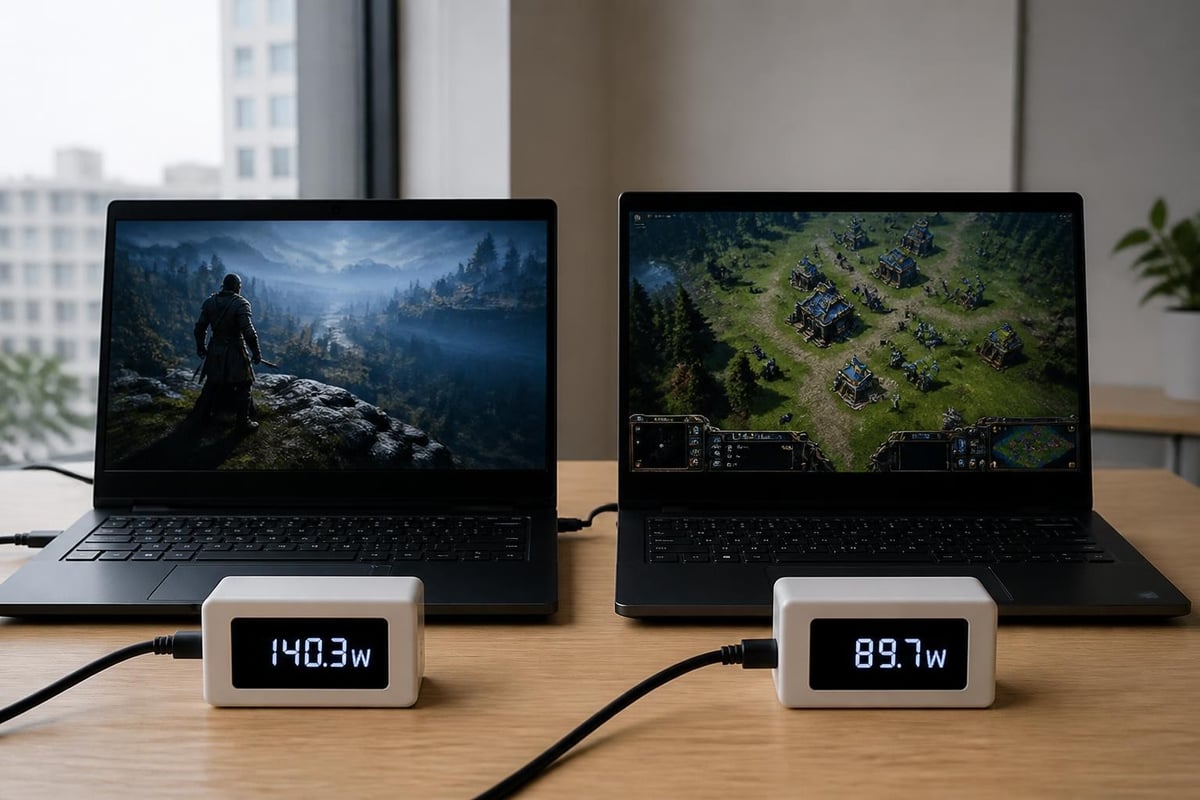
Touchscreen displays consume additional power compared to standard panels. However, recent innovations in power management have narrowed this gap. Nvidia's latest developments in efficient gaming laptop architecture promise unprecedented battery performance without sacrificing graphics capabilities.
Essential Specifications Beyond the Display
While touchscreen quality remains crucial, the best gaming laptop touch screen must excel across multiple hardware categories. Processing power, graphics capabilities, memory configuration, and storage solutions collectively determine system performance.
Processor and Graphics Card Selection
Modern gaming laptops utilize either Intel's 14th generation Core processors or AMD's Ryzen 7000 series chips. Both platforms deliver excellent performance, with specific advantages depending on workload types.
Processor considerations:
- Core count directly impacts multitasking capability during streaming and content creation
- Clock speeds determine single-thread performance for older games and applications
- Integrated graphics quality affects battery efficiency during light workloads
- AI acceleration features enhance productivity applications and creative software
Graphics cards remain the primary performance bottleneck in gaming scenarios. The RTX 4000 series provides ray tracing capabilities and DLSS upscaling technology, significantly improving visual fidelity and frame rates.
Memory and Storage Configuration
RAM capacity and speed influence system responsiveness, particularly during multitasking scenarios. Most gaming laptops ship with 16GB DDR5 memory, though 32GB configurations provide better future-proofing for demanding applications.
Storage solutions should prioritize NVMe SSDs with capacities starting at 512GB. Premium models often include dual drive configurations, separating operating system files from game libraries.
| Storage Tier | Minimum Capacity | Recommended Capacity | Performance Benchmark |
|---|---|---|---|
| Boot Drive | 512GB NVMe | 1TB Gen4 NVMe | 5,000 MB/s read |
| Game Library | 1TB SATA/NVMe | 2TB Gen4 NVMe | 3,500 MB/s read |
Thermal Management and Build Quality
Sustained gaming performance requires effective cooling solutions. The best gaming laptop touch screen models implement sophisticated thermal designs that balance noise levels with heat dissipation efficiency.
Cooling System Architecture
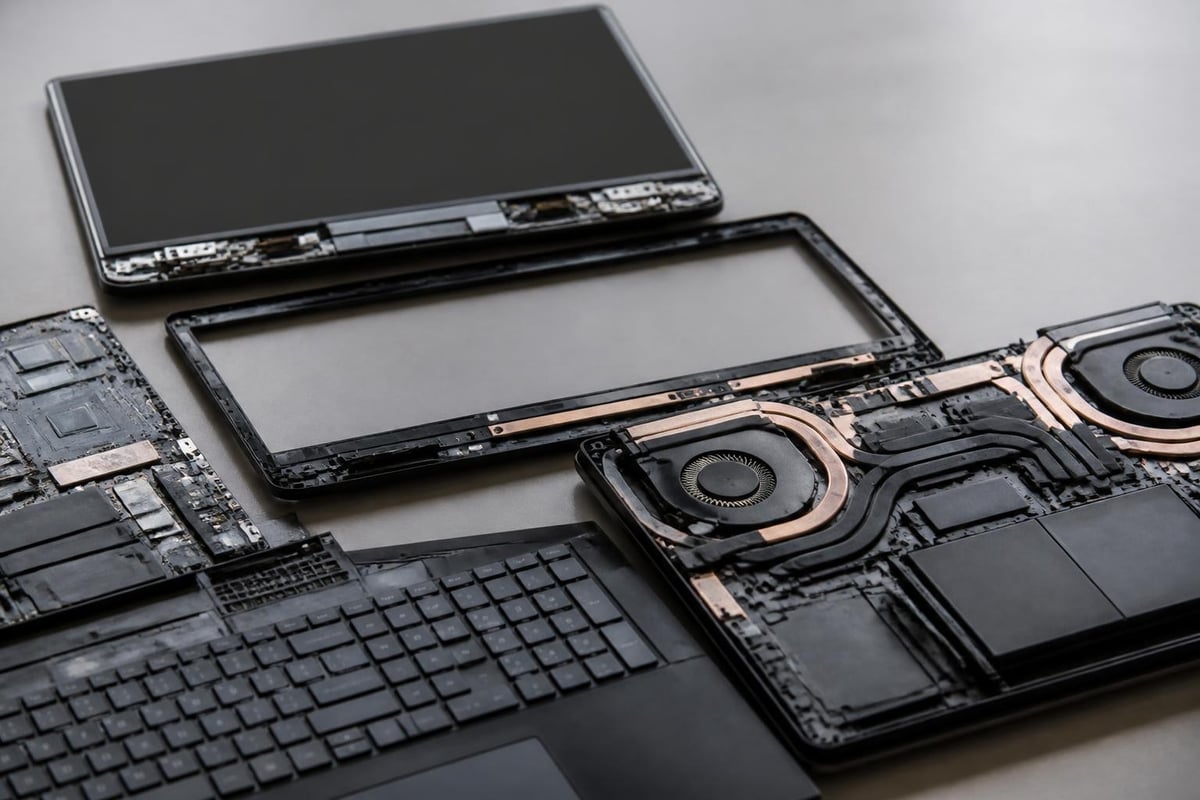
Premium gaming laptops employ vapor chamber cooling, multiple heat pipes, and strategically positioned fans to manage thermal loads. Touchscreen displays generate additional heat compared to standard panels, making thermal design even more critical.
The MSI Stealth series demonstrates how manufacturers balance thinness with cooling requirements. This thin and lightweight gaming laptop shows both the achievements and challenges of compact high-performance design with integrated touchscreen technology.
Critical thermal considerations:
- Sustained boost clock frequencies under load
- Fan noise levels during gaming and productivity tasks
- Surface temperatures around keyboard and palm rest areas
- Throttling behavior during extended gaming sessions
- Ambient temperature impact on performance
Build Materials and Durability
Touchscreen laptops endure more physical interaction than traditional designs. Build quality directly impacts longevity and user satisfaction. Aluminum chassis provide superior rigidity and heat dissipation compared to plastic alternatives.
Hinge mechanisms require special attention in touchscreen designs. They must support repeated opening and closing while accommodating touch pressure during tablet-style usage. Premium models implement reinforced hinge designs with extended durability ratings.
Display Quality and Touch Accuracy
The display represents the primary interface between users and their gaming experiences. Beyond basic touch functionality, the best gaming laptop touch screen models excel in color accuracy, brightness levels, and touch precision.
Color Accuracy and Professional Applications
Many gaming laptop users engage in content creation, streaming, or professional design work. Display color accuracy directly impacts these workflows. Factory calibration ensures accurate color reproduction across the sRGB and DCI-P3 color spaces.
Professional touchscreen laptop reviews often emphasize display quality alongside touch functionality. Models like the Dell XPS series and Asus Zenbook Duo demonstrate how premium displays enhance both gaming and productivity experiences.
Display quality metrics:
- Delta E color accuracy: Below 2.0 for professional work
- Maximum brightness: 300 nits minimum, 500+ nits preferred
- Contrast ratio: 1000:1 minimum for IPS, 100,000:1+ for OLED
- Anti-glare coating effectiveness
- Touch latency: Below 30ms for responsive interaction
Stylus Support and Creative Applications
Some touchscreen gaming laptops include stylus support, expanding functionality for digital artists and designers. Active stylus technology provides pressure sensitivity and palm rejection, enabling precise drawing and note-taking capabilities.
This feature particularly benefits users who alternate between gaming sessions and creative projects. The ability to sketch concepts, annotate documents, or create digital art without switching devices streamlines workflows and justifies the touchscreen premium.
Market Trends and Future Developments
The gaming laptop market continues evolving rapidly, with touchscreen integration becoming more sophisticated and affordable. Understanding current trends helps buyers make future-proof purchasing decisions.
AI Integration and Adaptive Performance
Artificial intelligence features increasingly influence gaming laptop performance. Adaptive cooling adjusts fan speeds based on workload demands, while intelligent power management optimizes battery life without sacrificing performance during critical gaming moments.
AI-enhanced upscaling technologies like DLSS 3.5 and AMD FSR 3 enable higher frame rates at lower power consumption levels. These features particularly benefit touchscreen gaming laptops, where battery efficiency significantly impacts portable gaming experiences.
Price-to-Performance Evolution
Competitive pressure among manufacturers has improved price-to-performance ratios across all market segments. Mid-range touchscreen gaming laptops in 2026 deliver capabilities that required premium pricing just two years ago.
Expert testing of current gaming laptops reveals how models like the HP Omen Max 16 and MSI Katana 15 HX B14W provide exceptional value without compromising essential features like touchscreen functionality or graphics performance.
Purchasing Considerations for Business and Educational Use
Organizations purchasing gaming laptops for design teams, engineering departments, or educational programs should evaluate touchscreen functionality differently than individual consumers.
Volume Purchasing and Support Requirements
Business deployments require consistent hardware specifications across device fleets. Touchscreen gaming laptops serving professional environments need reliable warranty coverage, available replacement parts, and responsive technical support.
Enterprise purchasing priorities:
- Standardized hardware configurations across team deployments
- Extended warranty options covering accidental damage
- Available on-site service for critical business operations
- Software licensing and pre-installation services
- Trade-in or upgrade programs for fleet refresh cycles
Total Cost of Ownership Analysis
Initial purchase price represents only one component of total ownership costs. Businesses should factor maintenance expenses, software licensing, peripheral accessories, and potential upgrade paths when evaluating the best gaming laptop touch screen options.
Energy efficiency impacts operational costs in large deployments. Modern gaming laptops with power-efficient components reduce electricity consumption while extending battery replacement intervals.
Regional Availability and Supply Chain Factors
Purchasing the best gaming laptop touch screen in Africa and the UAE requires understanding regional supply chains, import regulations, and warranty coverage variations.
Distribution Channels and Authorized Dealers
Working with established IT product suppliers ensures genuine products, valid warranties, and reliable after-sales support. Gray market imports may offer lower initial prices but typically lack local warranty service and technical support infrastructure.
Regional distributors maintain inventory tailored to local market preferences, climate considerations, and power infrastructure requirements. Gaming laptops deployed in high-temperature environments benefit from enhanced cooling specifications and components rated for extended temperature ranges.
Regional purchasing advantages:
- Local warranty service and repair facilities
- Power adapters matched to regional electrical standards
- Customs clearance and import duty management
- Bulk purchasing discounts for corporate deployments
- Technical support in local languages and time zones
Climate Considerations for Hardware Performance
High ambient temperatures in UAE and African regions impact gaming laptop performance. Dust accumulation, humidity variations, and temperature extremes require consideration when selecting the best gaming laptop touch screen for these environments.
Premium models with sealed components, advanced air filtration, and robust thermal solutions perform more reliably in challenging conditions. Regular maintenance schedules become even more critical in dusty environments to prevent cooling system degradation.
Accessory Ecosystem and Peripheral Integration
Maximizing the value of touchscreen gaming laptops often requires complementary accessories. External monitors, cooling pads, ergonomic keyboards, and precision mice enhance both gaming performance and productivity workflows.
Essential Accessories for Touchscreen Gaming
While touchscreens provide valuable flexibility, serious gaming still benefits from dedicated peripherals. High-DPI gaming mice, mechanical keyboards with customizable switches, and large mousepads improve competitive gaming performance.
Recommended accessory categories:
- External monitors for dual-display productivity setups
- Laptop cooling pads for sustained gaming sessions
- USB-C docking stations for streamlined connectivity
- Protective cases and sleeves for mobile professionals
- Screen protectors preserving touchscreen coating integrity
Peripheral Compatibility and Port Selection
Modern gaming laptops emphasize USB-C connectivity, often including Thunderbolt 4 support for high-bandwidth peripherals. Verifying port availability ensures compatibility with existing accessories and future peripheral upgrades.
The best gaming laptop touch screen models include diverse connectivity options: USB-A ports for legacy devices, HDMI or DisplayPort for external monitors, Ethernet for stable network connections, and SD card readers for content creators.
Choosing the best gaming laptop touch screen requires balancing performance specifications, display quality, build durability, and budget constraints while considering how touchscreen functionality enhances your specific workflow. Whether you prioritize competitive gaming performance, creative productivity, or versatile hybrid usage, today's market offers compelling options across all price ranges. Global Tronix Computer Trading LLC provides comprehensive IT product solutions throughout Africa and the UAE, offering expert guidance on gaming laptop selection, competitive pricing on leading brands, and reliable after-sales support to ensure your investment delivers long-term value for both personal and business applications.
