


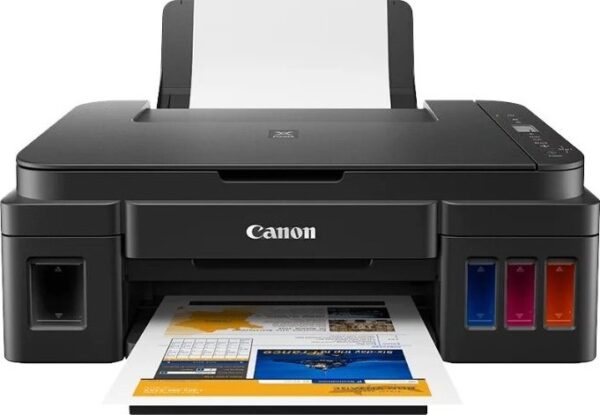
The Canon PIXMA G540 is perfect for printing large volumes of high-quality borderless photos up to A4 size¹ in a studio, at home or in the office. Total cost of ownership is reduced with this high-volume printer thanks to the six refillable dye-based ink tanks that last longer between refills. When the time comes to change inks, the process is error-free and mess-free thanks to the non-squeeze bottles with mechanical ID. The maintenance cartridge is also simple to replace at home or in the studio, minimising downtime on busy days. You’ll save time as you can print from your phone or tablet using the Canon PRINT App, Mopria or AirPrint, or connect via Wi-Fi to your devices.
- Additional red and grey inks enhance the colour gamut and minimise colour shift for accurate colour results
- Print high-quality borderless photos up to A4 size
- Enjoy easy, wireless printing through Wi-Fi, the Canon PRINT app, Mopria or AirPrint
- Minimise downtime in busy studio or business environments with a user-replaceable maintenance cartridge
- Get a high page yield from just one set of ink bottles – print 3,800 4×6” photos from each set
- No waiting around with fast photo print speeds – just 47 seconds to print a 4×6” photo
- Get creative with different media: this printer is compatible with magnetic, iron-on, restickable and matte paper
- Rear-feed capacity for up to 100 sheets at a time
- Easy to use, the 2-line LCD allows users to access information and adjust settings effortlessly, while automatic power off saves energy
- Compatible with Windows, Chrome OS and Mac OS

Specifications
-
Model NumbersPIXMA G540
-
FunctionsWi-Fi, Print & Cloud
Printer Specifications
-
Print ResolutionUp to 4800 x 1200 dpi
-
Print Technology2 FINE Print Heads (Left : BK/R/Gy, Right : C/M/Y)
Refillable ink tank printer -
Mono Print Speedapprox. 3.9 ipm
-
Colour Print Speedapprox. 3.9 ipm
-
Photo Print SpeedBorderless 4″ x 6″ (10x15cm) : Approx. 47 seconds
-
Borderless PrintingYes
A4, LTR, 4″” x 6″” (10x15cm), 5″” x 7″” (13x18cm), 7″” x 10″” (18x25cm), 8″” x 10″” (20x25cm), Square 5″” x 5″” (127mm x 127mm), Square 3.5″” x 3.5″” (89 mm x 89 mm), Card Size 55mm x 91 mm (2.17″” x 3.58″”)5 -
Two Sided PrintingManual operation
Consumables and Yields
-
Standard Ink BottlesGI-43 <BK>
GI-43 <C>
GI-43 <M>
GI-43 <Y>
GI-43 <R>
GI-43 <GY> -
Maintenance CartridgeMC-G02 (User Replaceable)
-
Bottle Yield (Plain Paper)A4 colour documents printing
Black: 3,700 pages
Colour: 8,000 pages
* Estimated supplemental yield -
Bottle Yield (Photo Paper)4″” x 6″” (10x15cm) colour photo printing
Colour: 3,800 photos
* Estimated supplemental yield
Paper Support
-
Paper TypesPlain Paper
Photo Paper Pro Luster (LU-101),
Photo Paper Plus Glossy II (PP-201)
Matte Photo Paper (MP-101),
Glossy Photo Paper “”Everyday Use”” (GP-501)
High Resolution Paper (HR-101N),
Photo Paper Plus Semi-gloss (SG-201),
Premium Fine Art Rough <FA-RG1>
Restickable Photo Paper(RP-101)
Magnetic Photo Paper(MG-101)
Dark Fabric Iron on Transfers (DF-101),
Light Fabric Iron on Transfers (LF-101),
Double sided Matte Paper (MP-101D)
Greeting Card (manufactured by Avery and RedRiverPaper),
Cardstock (manufactured by Neenah Paper and INKPRESS),
Canon Red Label Superior(WOP111)
Canon Oce Office Colour Paper(SAT213) -
Maximum Paper InputRear Tray: Plain paper: 64 – 105 g/m² (100 sheets) or supported genuine Canon papers
Please refer to online manual for a detailed list of paper load limits, which will vary depending on media type and page size selected. -
Paper SizesA4, A5, B5,A6, LTR, LGL, 4″” x 6″” (10x15cm), 5″” x 7″” (13x18cm), 7″” x 10″” (18x25cm), 8″” x 10″” (20x25cm), Square 5″” x 5″” (127mm x 127mm), Square 3.5″” x 3.5″” (89 mm x 89 mm), Card Size 55mm x 91 mm (2.17″”x3.58″”)
Envelopes(DL, COM10, C5, Monarch),[Custom size]
width 55 – 216 mm, length 89 – 1200 mm -
Paper WeightRear Tray: Plain paper: 64 – 105 g/m² or supported genuine Canon papers
Photo paper: max paper weight : approx. 275 g/m² or supported genuine Canon papers
Interface
-
Display Type & SizeFull Dot LCD (Monochrome)
Connectivity
-
Standard InterfaceHi-Speed USB (USB B Port)
Wi-Fi: IEEE802.11 b/g/n/a
Wi-Fi Security: WPA-PSK, WPA2-PSK, WEP, Administration password
Wireless LAN Frequency Band: 2.4 GHz
PictBridge Wi-Fi -
Mobile AppsCanon PRINT Inkjet/SELPHY app
Creative Park app
Easy-PhotoPrint Editor app -
Printer FeaturesEasy-PhotoPrint Editor Software
PIXMA Cloud Link (print – from smartphone or tablet only)
Canon Print Service Plugin (Android)
Apple AirPrint
Wireless Direct
Mopria (Android) -
Smart Assistant & Automation SupportAmazon Alexa™
Google Assistant
Software
-
Supported Operating SystemsWindows 10、Windows 8.1、Windows 7 SP1
Operation can only be guaranteed on a PC with pre-installed Windows 7or later.
Printer driver and IJ Printer Assistant Tool are available with following OS.
Windows Server 2008 R2 SP1、Windows Server 2012 R2、Windows Server 2016、Windows Server 2019Mac: OS X 10.12.6 ~ macOS 10.15
Chrome OS
Mobile Operating Systems: iOS®, iPadOS, Android™21
*OS compatibility confirmed at time of launch, please check the Canon Download Centre for support of subsequently released OS’s for this product.
-
Minimum System RequirementsWindows: 1.5GB or more
Note: for bundled software installation. The necessary amount of hard disk space required. -
Software IncludedPrinter Driver
IJ Printer Assistant Tool
Easy-PhotoPrint Editor (download)





Reviews
Clear filtersThere are no reviews yet.