- +971 56 918 6895
- sales@globaltechuae.com
- Salah Al Din Road, Deira, Dubai-UAE


Huawei- S5735-L24P4X-A1:CloudEngine S5735-L24
| Brand | HUAWEI |
|---|
13
People watching this product now!
Description
Huawei- S5735-L24P4X-A1:CloudEngine S5735-L24P4X-A1 (24*10/100/1000BASE-T ports, 4*10GE SFP+ ports, PoE+, AC power)
Overview
Table 4-1772 Basic information about the S5735-L24P4X-A1
| Item | Details |
|---|---|
| Description | S5735-L24P4X-A1 (24*10/100/1000BASE-T ports, 4*10GE SFP+ ports, PoE+, AC power) |
| Part Number | 98011318 |
| Model | S5735-L24P4X-A1 |
| First supported version | V200R020C10 |
| Other part numbers | 98011318-001: S5735-L24P4X-A1 (24*10/100/1000BASE-T ports, 4*10GE SFP+ ports, PoE+, AC power,
Only for India and Pakistan) |
| Remarks | Some models cannot be downgraded due to component upgrade. Therefore, you are advised to run the display system-software information command (supported in V200R021C00 and later versions) to check the software versions supported by the device before performing a downgrade. |
Components
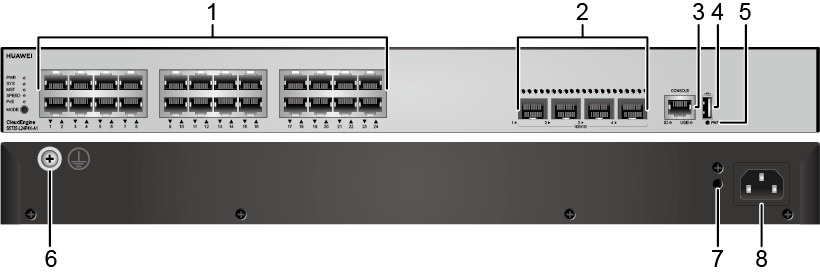
Figure 4-628 S5735-L24P4X-A1 appearance
|
1 |
Twenty-four 10/100/1000BASE-T PoE+ ports |
2 |
Four 10GE SFP+ ports |
|
3 |
One console port |
4 |
One USB port |
|
5 |
One PNP button NOTICE: To restore the factory settings and reset the switch, hold down the button for at least 6 seconds. To reset the switch, press the button. Resetting the switch will cause service interruption. Exercise caution when you press the PNP button. |
6 |
Ground screw NOTE: It is used with a ground cable.
|
|
7 |
Jack for AC power cable locking strap NOTE: The AC power cable locking strap is not delivered with the switch.
|
8 |
AC socket NOTE: It is used with an AC power cable. |
Ports
Table 4-1773 Ports on the S5735-L24P4X-A1
| Port | Connector Type | Description | Available Components |
|---|---|---|---|
| 10/100/1000BASE-T PoE+ port | RJ45 | A 10/100/1000BASE-T Ethernet electrical port sends and receives service data at 10/100/1000 Mbit/s.
The port supports the PoE function. |
Ethernet cable |
| 10GE SFP+ optical port | SFP+ | A 10GE SFP+ Ethernet optical port supports auto-sensing to 1000 Mbit/s. It sends and receives service data at 1000 Mbit/s or 10 Gbit/s. |
|
| Console port | RJ45 | The console port is connected to a console for on-site configuration. | Console cable |
| USB port | USB 2.0 Type A | The USB port can have a USB flash drive connected to upgrade the switch, or transfer configuration files or other files. The USB port can only connect to a USB flash drive that complies with USB 2.0.
USB flash drives from different vendors differ in model compatibility and drivers. If a USB flash drive cannot be used, try to replace it with another one from a mainstream vendor. Switches support a maximum of 128 GB USB flash drives. |
You must be logged in to post a review.
Related products


TP-Link Layer 3 License Upgrade for T2700G-28TQ | T2700G-28TQ-L1000
In stock
د.إ 1,770.20
SKU:
GTC15000580

Reviews
There are no reviews yet.