- +971 56 918 6895
- sales@globaltechuae.com
- Salah Al Din Road, Deira, Dubai-UAE

WiFi Laptops: Complete Guide for Business & Personal Use


Modern computing demands seamless connectivity, and wifi laptops have become the standard for both business and personal use. Gone are the days when physical ethernet cables tethered users to specific locations. Today's wireless technology enables professionals to work from conference rooms, coffee shops, or home offices with equal efficiency. Understanding the nuances of wifi laptops helps buyers make informed decisions that align with their connectivity needs, budget constraints, and performance expectations. Whether you're equipping a corporate fleet or upgrading a personal device, the wireless capabilities of your laptop directly impact productivity and user experience.
Understanding WiFi Technology in Modern Laptops
WiFi technology has transformed dramatically since its introduction, and WiFi technology continues to evolve at a rapid pace. The wireless standards that power wifi laptops have progressed from the original 802.11b, offering modest speeds of 11 Mbps, to the latest WiFi 7 standard capable of delivering multi-gigabit throughput. Each generation brings improvements in speed, range, reliability, and the ability to handle multiple connected devices simultaneously.
Current WiFi Standards and Their Impact
The wireless landscape in 2026 features several active standards, each offering distinct advantages:
- WiFi 5 (802.11ac): Still common in budget and mid-range laptops, offering speeds up to 3.5 Gbps on the 5 GHz band
- WiFi 6 (802.11ax): Now the mainstream standard, providing better performance in congested environments with speeds up to 9.6 Gbps
- WiFi 6E: Extends WiFi 6 capabilities into the 6 GHz band, reducing interference and increasing available channels
- WiFi 7 (802.11be): The cutting-edge standard appearing in premium 2026 laptops, delivering speeds exceeding 40 Gbps with ultra-low latency
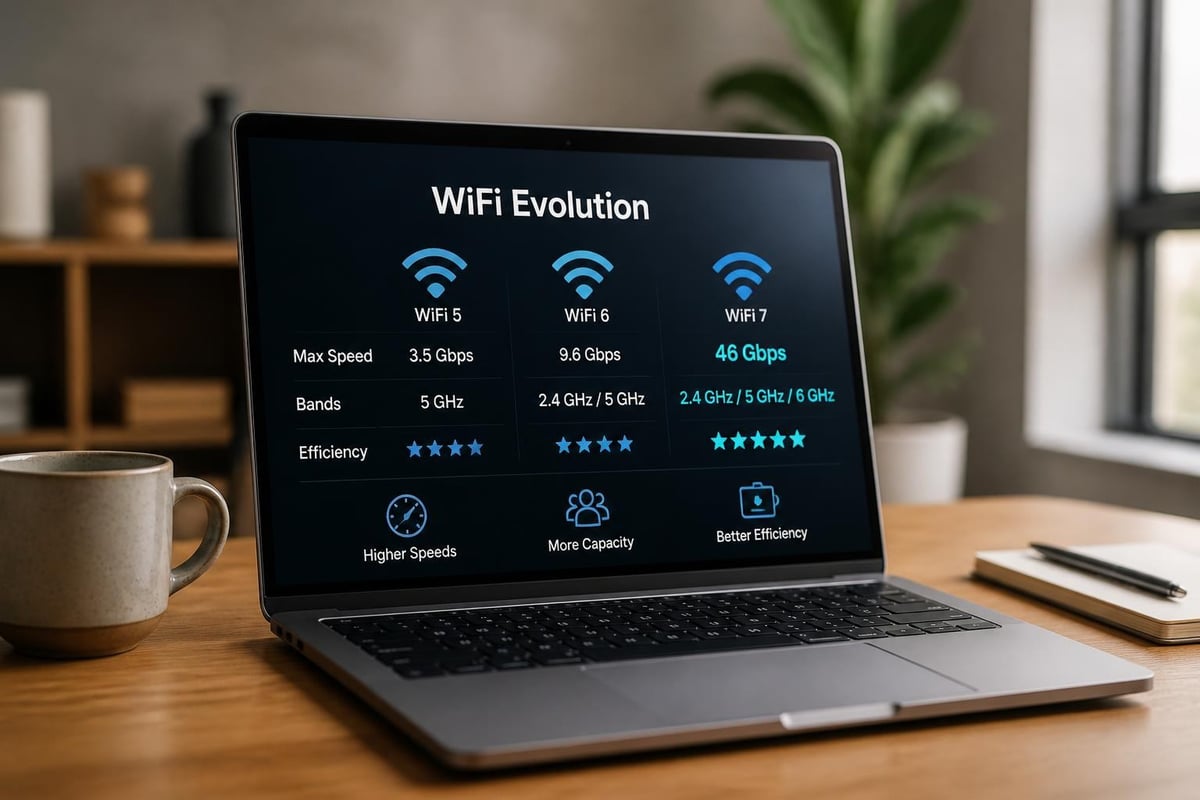
Understanding which standard your wifi laptops support matters significantly for real-world performance. A laptop with WiFi 6E connected to a WiFi 5 router will operate at WiFi 5 speeds, making router compatibility a critical consideration. Organizations upgrading their laptop fleet should evaluate their existing network infrastructure to ensure they can leverage the full capabilities of newer wireless standards.
Key Features to Evaluate in WiFi Laptops
When selecting wifi laptops for business or personal use, several wireless-specific features deserve careful consideration beyond the basic WiFi standard designation.
Dual-Band and Tri-Band Capabilities
Modern wifi laptops typically support dual-band connectivity, operating on both 2.4 GHz and 5 GHz frequencies. The importance of dual-band support cannot be overstated for optimal network performance. The 2.4 GHz band offers better range and wall penetration but lower speeds and more interference, while the 5 GHz band provides faster speeds with shorter range.
Tri-band laptops with WiFi 6E or WiFi 7 add access to the 6 GHz spectrum, delivering:
- Reduced interference from legacy devices
- More available channels for data transmission
- Better performance in high-density environments
- Lower latency for real-time applications
Antenna Configuration and MIMO Technology
The number and quality of antennas in wifi laptops directly affect signal strength and stability. Most modern laptops feature 2×2 MIMO (Multiple Input Multiple Output) configurations, while premium models may include 3×3 or 4×4 arrays. Higher antenna counts enable:
- Stronger signal reception in challenging environments
- Better throughput at longer distances from access points
- Improved performance when multiple applications demand bandwidth simultaneously
- Enhanced reliability during video conferencing and streaming
| Feature | Entry-Level | Mid-Range | Premium |
|---|---|---|---|
| WiFi Standard | WiFi 5 | WiFi 6 | WiFi 6E/7 |
| Antenna Config | 1×1 MIMO | 2×2 MIMO | 3×3/4×4 MIMO |
| Max Speed | 433 Mbps | 1.2 Gbps | 2.4+ Gbps |
| Band Support | Dual | Dual | Tri-band |
Performance Considerations for Different Use Cases
WiFi laptops serve diverse purposes, and performance requirements vary significantly based on application scenarios. Matching wireless capabilities to actual usage patterns prevents overspending while ensuring adequate performance.
Business and Enterprise Applications
Corporate environments demand reliable connectivity for productivity applications, cloud services, and collaboration tools. WiFi laptops deployed in business settings should prioritize:
Stable connections for video conferencing platforms like Zoom and Microsoft Teams, where dropouts create unprofessional impressions and disrupt communication. WiFi 6 or newer standards handle multiple concurrent connections more efficiently, crucial when dozens of employees connect to the same access point.
Security features including WPA3 encryption support protect sensitive corporate data transmitted over wireless networks. Enterprise-grade wifi laptops often include additional security chips and management features that IT departments can configure remotely.
Roaming capabilities that maintain connections as users move between access points throughout office buildings or campuses. Seamless handoffs prevent application interruptions and maintain VPN connections during transitions.

Creative Professional Requirements
Designers, video editors, and content creators working with large files need exceptional wireless performance from their wifi laptops. Transferring multi-gigabyte project files to network storage over WiFi requires:
- WiFi 6E or WiFi 7 for maximum throughput
- Quality routers that match laptop capabilities
- Minimal interference environments or dedicated channels
- High-quality antenna implementations for consistent speeds
Home and Educational Use
Students and home users typically have less demanding requirements but still benefit from capable wifi laptops. Basic web browsing, document editing, and video streaming perform adequately on WiFi 5 or WiFi 6 systems. However, homes with multiple users streaming 4K content simultaneously should consider laptops with newer standards to reduce network congestion.
Optimizing WiFi Performance on Your Laptop
Even premium wifi laptops may underperform without proper configuration and environmental considerations. Several factors influence real-world wireless performance beyond the laptop's hardware specifications.
Router Selection and Placement
Choosing the right WiFi router significantly impacts how well your wifi laptops perform. The best laptop wireless cards cannot overcome limitations in router hardware, firmware, or placement. Position routers centrally, elevated, and away from interference sources like microwaves and cordless phones.
Modern mesh systems solve coverage challenges in larger homes and offices, ensuring wifi laptops maintain strong connections throughout the space. When evaluating mesh systems, verify compatibility with your laptop's wireless standards to avoid bottlenecks.
Driver Updates and Software Optimization
Manufacturers regularly release wireless driver updates that improve performance, fix bugs, and add features to wifi laptops. Checking for updates quarterly ensures optimal performance:
- Visit manufacturer support websites directly
- Use built-in update utilities when available
- Review release notes to understand improvements
- Test connectivity after updates to verify stability
Network Configuration Best Practices
Proper network setup maximizes the capabilities of wifi laptops:
- Channel selection: Use WiFi analyzer tools to identify less congested channels, especially on 2.4 GHz where interference is common
- Bandwidth allocation: Configure Quality of Service (QoS) settings on routers to prioritize critical applications
- Security settings: Enable WPA3 when all devices support it, falling back to WPA2 only when necessary
- Band steering: Allow routers to automatically assign devices to optimal frequency bands
| Optimization Area | Impact Level | Difficulty | Frequency |
|---|---|---|---|
| Router Placement | High | Low | One-time |
| Driver Updates | Medium | Low | Quarterly |
| Channel Selection | Medium | Medium | Monthly |
| QoS Configuration | Medium | High | As needed |
Emerging Technologies and Future Trends
The landscape of wifi laptops continues to evolve with innovations that promise enhanced performance and new capabilities. Understanding WiFi fundamentals provides context for appreciating these developments.
WiFi Sensing and Advanced Applications
Beyond traditional connectivity, wifi laptops are beginning to leverage wireless signals for novel purposes. Research into gesture recognition and human sensing opens possibilities for new interaction methods. WiFi-based positioning systems enable location-aware applications without GPS, particularly valuable for indoor environments where satellite signals prove unreliable.
These advanced applications demonstrate how wifi laptops may transcend simple data transmission, becoming sensors that understand their environment and user behavior. While still emerging, such capabilities hint at future computing paradigms where wireless technology serves multiple simultaneous purposes.
Integration with 5G and Satellite Networks
Premium wifi laptops increasingly include cellular modems alongside traditional wireless capabilities. This convergence allows seamless switching between WiFi, 5G, and even satellite connectivity based on availability and performance. Business travelers particularly benefit from always-connected devices that automatically select optimal networks without user intervention.
The combination of WiFi 7's multi-gigabit speeds and 5G's ubiquitous coverage creates unprecedented flexibility for mobile professionals. Wifi laptops with cellular backup ensure productivity continues even when conventional wireless networks prove unavailable or unreliable.
Selecting WiFi Laptops for Specific Industries
Different sectors have unique requirements that influence which wifi laptops provide optimal value and performance.
Healthcare Environments
Medical facilities require wifi laptops that support secure, reliable connectivity for electronic health records and imaging applications. Hospital-grade devices often feature antimicrobial coatings and fanless designs that minimize dust accumulation. Wireless performance must remain consistent even in electromagnetically challenging environments filled with medical equipment.
Education Sector Needs
Schools and universities deploying wifi laptops for students prioritize affordability, durability, and adequate performance for educational software. Chromebooks and budget Windows laptops with WiFi 5 or WiFi 6 typically suffice for classroom applications. Centralized management capabilities allow IT administrators to configure and update hundreds of devices efficiently.
Field Service and Construction
Rugged wifi laptops designed for harsh environments combine industrial-grade durability with reliable wireless connectivity. These devices often include enhanced antennas to maintain connections in areas with challenging RF conditions. Water and dust resistance protect against jobsite hazards while allowing technicians to access cloud-based systems and documentation.

Troubleshooting Common WiFi Laptop Issues
Even well-configured wifi laptops occasionally experience connectivity problems. Understanding common issues and their solutions minimizes downtime and frustration.
Slow Connection Speeds
When wifi laptops deliver disappointing throughput, several culprits may be responsible:
- Distance from access point: Signal strength degrades with distance, reducing speeds exponentially
- Interference sources: Neighboring networks, Bluetooth devices, and household electronics create RF noise
- Outdated drivers: Old wireless software may not optimize performance or support newer features
- Router limitations: Older routers create bottlenecks regardless of laptop capabilities
- Background applications: Automatic updates and cloud sync services consume bandwidth invisibly
Systematic troubleshooting identifies root causes. Check signal strength, test at various distances, temporarily disable other devices, and monitor network activity to isolate problems.
Intermittent Disconnections
Wifi laptops that repeatedly drop connections disrupt workflows and indicate underlying problems:
- Power management settings that disable wireless adapters to save battery
- Access point capacity limits when too many devices connect simultaneously
- Firmware bugs in routers or laptop wireless cards
- Physical obstructions that create dead zones
- Incompatible security settings between laptop and router
Addressing intermittent issues often requires testing multiple variables. Document when disconnections occur, what activities precede them, and environmental factors to establish patterns.
Limited Range Problems
Some wifi laptops struggle to maintain connections at distances where other devices perform adequately. Antenna quality varies significantly between manufacturers and models, with budget devices sometimes featuring inferior implementations. External USB wireless adapters can extend range for stationary use, though this compromises portability.
WiFi Laptops and Battery Life Considerations
Wireless connectivity impacts battery endurance, and understanding this relationship helps optimize wifi laptops for maximum runtime. Active WiFi radios consume measurable power, with newer standards generally offering better efficiency through improved power management protocols.
WiFi 6 and WiFi 7 include Target Wake Time (TWT) features that schedule communication intervals, allowing wireless radios to sleep between transmissions. This extends battery life significantly compared to older standards that maintain constant readiness. When configuring wifi laptops for mobile use, consider:
- Disabling WiFi when working offline to eliminate unnecessary power drain
- Reducing automatic sync and update activities that trigger wireless transmissions
- Using airplane mode during focused work sessions without connectivity needs
- Selecting power profiles that optimize wireless performance versus battery longevity
The balance between connectivity and endurance varies by user. Business travelers may prioritize runtime over peak wireless speeds, while office workers with constant access to power can favor performance.
Market Landscape and Purchasing Considerations
The wifi laptops market in 2026 offers exceptional variety, with options spanning from basic budget devices to cutting-edge professional workstations. Comprehensive laptop reviews help buyers navigate this complex landscape and identify models matching their specific requirements.
Price-Performance Analysis
Entry-level wifi laptops with WiFi 5 and basic antenna configurations start below $400, suitable for light productivity and web-based applications. Mid-range devices offering WiFi 6, better antennas, and enhanced build quality occupy the $700-$1,200 segment. Premium laptops with WiFi 6E or WiFi 7, top-tier components, and professional-grade construction exceed $1,500.
Price directly correlates with wireless performance capabilities, but buyers should evaluate whether premium features align with actual usage patterns. Purchasing WiFi 7 laptops makes little sense when connecting to WiFi 5 infrastructure, though it provides future-proofing for eventual network upgrades.
Warranty and Support Considerations
Enterprise buyers of wifi laptops should prioritize manufacturers offering robust business support, including:
- Next-business-day replacement options minimizing downtime
- On-site service avoiding shipping delays
- Extended warranty coverage protecting long-term investments
- Direct technical support bypassing consumer-level call centers
Consumer-focused brands often lack these enterprise amenities despite offering competitive hardware specifications and pricing.
Selecting the right wifi laptops requires balancing current needs with future requirements, understanding how wireless standards impact real-world performance, and matching capabilities to actual usage patterns. Whether equipping a corporate environment, educational institution, or home office, wireless connectivity remains central to the computing experience. Global Tronix Computer Trading LLC offers comprehensive selection of wifi laptops from trusted global brands, backed by expert guidance to help you choose devices that deliver optimal wireless performance for your specific requirements across Africa and the UAE.
